This rune is part of @refrakt-md/marketing. Install with npm install @refrakt-md/marketing and add "@refrakt-md/marketing" to the plugins array in your refrakt.config.json.
Bento
A grid of cells. Each cell is a small card living in a grid track. There are two ways to author one — heading sugar (each heading becomes a cell, its depth setting the tile size) or explicit cells ({% bento-cell %} for precise per-tile control). Bento is a grid primitive, not a page-section: it has no eyebrow/title/blurb header. To title a grid, wrap it in a feature or section.
Heading sugar
Each heading becomes a cell; the heading itself is the cell title. Tile size comes from the heading level, with a fixed mapping: # → full, ## → large, ### → medium, ####+ → small. The mapping is absolute, so ### Coral always produces a medium tile regardless of what else is in the grid. Content before the first heading renders loose, above the grid. (Every cell title still renders as an h3 in the DOM — input level is purely a sizing dial.)
{% bento columns=6 %}
## Featured Article

This cell spans two-thirds of the grid across two rows — the hero of the layout.

#### Tip of the Day

A small cell — a third of the grid width — sits beside the hero.

#### Did You Know?

Another small cell tucks under the first, still beside the hero.

### Quick Update

A medium cell, half the grid width.

### Latest News

Another medium pairs alongside.
{% /bento %}<section data-rune="bento" data-rune-fields="{"gap":"1rem","columns":"6","row-height":"","content-height":"","media-ratio":"","collapse":""}">
<div data-name="grid">
<div data-field="cell" data-rune="bento-cell" data-rune-fields="{"size":"large","cols":"4","rows":"2","content-height":"","media-ratio":""}" data-media-position="start">
<h3 id="featured-article" data-name="title">Featured Article</h3>
<div data-name="body">
<p>This cell spans two-thirds of the grid across two rows — the hero of the layout.</p>
</div>
</div>
<div data-field="cell" data-rune="bento-cell" data-rune-fields="{"size":"small","cols":"2","rows":"1","content-height":"","media-ratio":""}" data-media-position="top">
<h3 id="tip-of-the-day" data-name="title">Tip of the Day</h3>
<div data-name="body">
<p>A small cell — a third of the grid width — sits beside the hero.</p>
</div>
</div>
<div data-field="cell" data-rune="bento-cell" data-rune-fields="{"size":"small","cols":"2","rows":"1","content-height":"","media-ratio":""}" data-media-position="top">
<h3 id="did-you-know" data-name="title">Did You Know?</h3>
<div data-name="body">
<p>Another small cell tucks under the first, still beside the hero.</p>
</div>
</div>
<div data-field="cell" data-rune="bento-cell" data-rune-fields="{"size":"medium","cols":"3","rows":"1","content-height":"","media-ratio":""}" data-media-position="top">
<h3 id="quick-update" data-name="title">Quick Update</h3>
<div data-name="body">
<p>A medium cell, half the grid width.</p>
</div>
</div>
<div data-field="cell" data-rune="bento-cell" data-rune-fields="{"size":"medium","cols":"3","rows":"1","content-height":"","media-ratio":""}" data-media-position="top">
<h3 id="latest-news" data-name="title">Latest News</h3>
<div data-name="body">
<p>Another medium pairs alongside.</p>
</div>
</div>
</div>
</section>Featured Article
This cell spans two-thirds of the grid across two rows — the hero of the layout.
Tip of the Day
A small cell — a third of the grid width — sits beside the hero.
Did You Know?
Another small cell tucks under the first, still beside the hero.
Quick Update
A medium cell, half the grid width.
Latest News
Another medium pairs alongside.
<section class="rf-bento" data-columns="6" data-gap="1rem" data-row-height="" data-content-height="" data-media-ratio="" data-collapse="" data-elevation="flush" data-rune="bento" data-density="full" style="--bento-columns: 6; --bento-gap: 1rem">
  <div data-name="grid" class="rf-bento__grid">
    <div data-field="cell" class="rf-bento-cell" data-media-position="start" data-size="large" data-cols="4" data-rows="2" data-content-height="" data-media-ratio="" data-rune="bento-cell" data-density="compact" style="--cell-cols: 4; --cell-rows: 2">
      <div data-name="content" class="rf-bento-cell__content">
        <h3 id="featured-article" data-name="title" class="rf-bento-cell__title" data-section="title">Featured Article</h3>
        <div data-name="body" class="rf-bento-cell__body" data-section="body">
          <p>This cell spans two-thirds of the grid across two rows — the hero of the layout.</p>
        </div>
      </div>
    </div>
    <div data-field="cell" class="rf-bento-cell" data-media-position="top" data-size="small" data-cols="2" data-rows="1" data-content-height="" data-media-ratio="" data-rune="bento-cell" data-density="compact" style="--cell-cols: 2; --cell-rows: 1">
      <div data-name="content" class="rf-bento-cell__content">
        <h3 id="tip-of-the-day" data-name="title" class="rf-bento-cell__title" data-section="title">Tip of the Day</h3>
        <div data-name="body" class="rf-bento-cell__body" data-section="body">
          <p>A small cell — a third of the grid width — sits beside the hero.</p>
        </div>
      </div>
    </div>
    <div data-field="cell" class="rf-bento-cell" data-media-position="top" data-size="small" data-cols="2" data-rows="1" data-content-height="" data-media-ratio="" data-rune="bento-cell" data-density="compact" style="--cell-cols: 2; --cell-rows: 1">
      <div data-name="content" class="rf-bento-cell__content">
        <h3 id="did-you-know" data-name="title" class="rf-bento-cell__title" data-section="title">Did You Know?</h3>
        <div data-name="body" class="rf-bento-cell__body" data-section="body">
          <p>Another small cell tucks under the first, still beside the hero.</p>
        </div>
      </div>
    </div>
    <div data-field="cell" class="rf-bento-cell" data-media-position="top" data-size="medium" data-cols="3" data-rows="1" data-content-height="" data-media-ratio="" data-rune="bento-cell" data-density="compact" style="--cell-cols: 3; --cell-rows: 1">
      <div data-name="content" class="rf-bento-cell__content">
        <h3 id="quick-update" data-name="title" class="rf-bento-cell__title" data-section="title">Quick Update</h3>
        <div data-name="body" class="rf-bento-cell__body" data-section="body">
          <p>A medium cell, half the grid width.</p>
        </div>
      </div>
    </div>
    <div data-field="cell" class="rf-bento-cell" data-media-position="top" data-size="medium" data-cols="3" data-rows="1" data-content-height="" data-media-ratio="" data-rune="bento-cell" data-density="compact" style="--cell-cols: 3; --cell-rows: 1">
      <div data-name="content" class="rf-bento-cell__content">
        <h3 id="latest-news" data-name="title" class="rf-bento-cell__title" data-section="title">Latest News</h3>
        <div data-name="body" class="rf-bento-cell__body" data-section="body">
          <p>Another medium pairs alongside.</p>
        </div>
      </div>
    </div>
  </div>
</section>
Cell sizes
The grid is 6 columns by default. Size presets resolve as proportions of the column count, so a preset holds its ratio at any columns:
| Heading | Size | Span (at 6 cols) | Proportion |
|---|---|---|---|
# (h1) | full | 6 cols × 1 row | full width |
## (h2) | large | 4 cols × 2 rows | ⅔ width, 2 rows |
### (h3) | medium | 3 cols × 1 row | ½ width |
####+ (h4+) | small | 2 cols × 1 row | ⅓ width |
Rows are uniform fixed-height tracks, so a large cell is genuinely twice as tall and a tall guest is bounded by its track rather than ballooning the row. Set the track height with row-height (sm · md · lg · xl), or theme the default via --rf-bento-row-height.
Custom ladders
The tiered presets are a sensible default, but heading level can drive any footprint you like. Set levels to an explicit ladder — a comma-separated list of rungs indexed by heading level (rung 0 = #/h1, rung 1 = ##/h2, rung 2 = ###/h3, and so on). Each rung is either a column count W (one row tall) or a full WxH footprint:
{% bento columns=6 levels="6,3,2" collapse="sm" %}
# Launch

`#` lands on rung 0 — the full width.

## Metrics

`##` lands on rung 1 — half-width, pairs with the next.

## Activity

Half-width.

### Alpha

`###` lands on rung 2 — a third.

### Beta

A third.

### Gamma

A third.
{% /bento %}<section data-rune="bento" data-rune-fields="{"gap":"1rem","columns":"6","row-height":"","content-height":"","media-ratio":"","collapse":"sm"}">
<div data-name="grid">
<div data-field="cell" data-rune="bento-cell" data-rune-fields="{"size":"","cols":"6","rows":"1","content-height":"","media-ratio":""}" data-media-position="top">
<h3 id="launch" data-name="title">Launch</h3>
<div data-name="body">
<p>
<code>#</code>
lands on rung 0 — the full width.
</p>
</div>
</div>
<div data-field="cell" data-rune="bento-cell" data-rune-fields="{"size":"","cols":"3","rows":"1","content-height":"","media-ratio":""}" data-media-position="top">
<h3 id="metrics" data-name="title">Metrics</h3>
<div data-name="body">
<p>
<code>##</code>
lands on rung 1 — half-width, pairs with the next.
</p>
</div>
</div>
<div data-field="cell" data-rune="bento-cell" data-rune-fields="{"size":"","cols":"3","rows":"1","content-height":"","media-ratio":""}" data-media-position="top">
<h3 id="activity" data-name="title">Activity</h3>
<div data-name="body">
<p>Half-width.</p>
</div>
</div>
<div data-field="cell" data-rune="bento-cell" data-rune-fields="{"size":"","cols":"2","rows":"1","content-height":"","media-ratio":""}" data-media-position="top">
<h3 id="alpha" data-name="title">Alpha</h3>
<div data-name="body">
<p>
<code>###</code>
lands on rung 2 — a third.
</p>
</div>
</div>
<div data-field="cell" data-rune="bento-cell" data-rune-fields="{"size":"","cols":"2","rows":"1","content-height":"","media-ratio":""}" data-media-position="top">
<h3 id="beta" data-name="title">Beta</h3>
<div data-name="body">
<p>A third.</p>
</div>
</div>
<div data-field="cell" data-rune="bento-cell" data-rune-fields="{"size":"","cols":"2","rows":"1","content-height":"","media-ratio":""}" data-media-position="top">
<h3 id="gamma" data-name="title">Gamma</h3>
<div data-name="body">
<p>A third.</p>
</div>
</div>
</div>
</section>Launch
# lands on rung 0 — the full width.
Metrics
## lands on rung 1 — half-width, pairs with the next.
Activity
Half-width.
Alpha
### lands on rung 2 — a third.
Beta
A third.
Gamma
A third.
<section class="rf-bento" data-columns="6" data-gap="1rem" data-row-height="" data-content-height="" data-media-ratio="" data-collapse="sm" data-elevation="flush" data-rune="bento" data-density="full" style="--bento-columns: 6; --bento-gap: 1rem">
  <div data-name="grid" class="rf-bento__grid">
    <div data-field="cell" class="rf-bento-cell" data-media-position="top" data-size="" data-cols="6" data-rows="1" data-content-height="" data-media-ratio="" data-rune="bento-cell" data-density="compact" style="--cell-cols: 6; --cell-rows: 1">
      <div data-name="content" class="rf-bento-cell__content">
        <h3 id="launch" data-name="title" class="rf-bento-cell__title" data-section="title">Launch</h3>
        <div data-name="body" class="rf-bento-cell__body" data-section="body">
          <p>
            <code>#</code>
             lands on rung 0 — the full width.
          </p>
        </div>
      </div>
    </div>
    <div data-field="cell" class="rf-bento-cell" data-media-position="top" data-size="" data-cols="3" data-rows="1" data-content-height="" data-media-ratio="" data-rune="bento-cell" data-density="compact" style="--cell-cols: 3; --cell-rows: 1">
      <div data-name="content" class="rf-bento-cell__content">
        <h3 id="metrics" data-name="title" class="rf-bento-cell__title" data-section="title">Metrics</h3>
        <div data-name="body" class="rf-bento-cell__body" data-section="body">
          <p>
            <code>##</code>
             lands on rung 1 — half-width, pairs with the next.
          </p>
        </div>
      </div>
    </div>
    <div data-field="cell" class="rf-bento-cell" data-media-position="top" data-size="" data-cols="3" data-rows="1" data-content-height="" data-media-ratio="" data-rune="bento-cell" data-density="compact" style="--cell-cols: 3; --cell-rows: 1">
      <div data-name="content" class="rf-bento-cell__content">
        <h3 id="activity" data-name="title" class="rf-bento-cell__title" data-section="title">Activity</h3>
        <div data-name="body" class="rf-bento-cell__body" data-section="body">
          <p>Half-width.</p>
        </div>
      </div>
    </div>
    <div data-field="cell" class="rf-bento-cell" data-media-position="top" data-size="" data-cols="2" data-rows="1" data-content-height="" data-media-ratio="" data-rune="bento-cell" data-density="compact" style="--cell-cols: 2; --cell-rows: 1">
      <div data-name="content" class="rf-bento-cell__content">
        <h3 id="alpha" data-name="title" class="rf-bento-cell__title" data-section="title">Alpha</h3>
        <div data-name="body" class="rf-bento-cell__body" data-section="body">
          <p>
            <code>###</code>
             lands on rung 2 — a third.
          </p>
        </div>
      </div>
    </div>
    <div data-field="cell" class="rf-bento-cell" data-media-position="top" data-size="" data-cols="2" data-rows="1" data-content-height="" data-media-ratio="" data-rune="bento-cell" data-density="compact" style="--cell-cols: 2; --cell-rows: 1">
      <div data-name="content" class="rf-bento-cell__content">
        <h3 id="beta" data-name="title" class="rf-bento-cell__title" data-section="title">Beta</h3>
        <div data-name="body" class="rf-bento-cell__body" data-section="body">
          <p>A third.</p>
        </div>
      </div>
    </div>
    <div data-field="cell" class="rf-bento-cell" data-media-position="top" data-size="" data-cols="2" data-rows="1" data-content-height="" data-media-ratio="" data-rune="bento-cell" data-density="compact" style="--cell-cols: 2; --cell-rows: 1">
      <div data-name="content" class="rf-bento-cell__content">
        <h3 id="gamma" data-name="title" class="rf-bento-cell__title" data-section="title">Gamma</h3>
        <div data-name="body" class="rf-bento-cell__body" data-section="body">
          <p>A third.</p>
        </div>
      </div>
    </div>
  </div>
</section>
Two recipes worth knowing:
- Uniform height, width by depth —
levels="6,5,4,3,2,1". Every cell is one row tall, so the grid keeps a flat, even rhythm while width still tracks heading importance. - Varied-height feed —
levels="6x1,6x2,6x3". Full-width cells that grow taller with depth, for a timeline or changelog feel.
A few rules:
- Headings deeper than the ladder clamp to the last rung — write only as many rungs as you have distinct sizes (
levels="6,3,2"covers#/##/###;####and deeper stay a third). - Rungs are absolute column counts measured against
columns; if you changecolumns, revisit the ladder. (The tiered presets, by contrast, are proportional and scale automatically.) - A bento that doesn't use
#can leave rung 0 as a placeholder — only the rungs matching headings you actually write are used. levelsonly affects heading sugar — explicit{% bento-cell %}grids ignore it.
Media zones
A cell's content splits on a top-level --- into media / body / footer zones, exactly like card. The media zone clips and sizes its guest, so any visual rune (chart, map, gallery, mockup, showcase) drops in and adapts automatically.
A media guest is presentational by default. In a cell with href (a stretched whole-tile link), an interactive guest — a codegroup, a live map — is demoted to its static fallback and made pointer-events: none so the whole cell links reliably (and a build warning fires); body/footer controls stay clickable. A non-linked cell hosts interactive guests normally. See the interaction-posture contract.
{% bento columns=6 %}
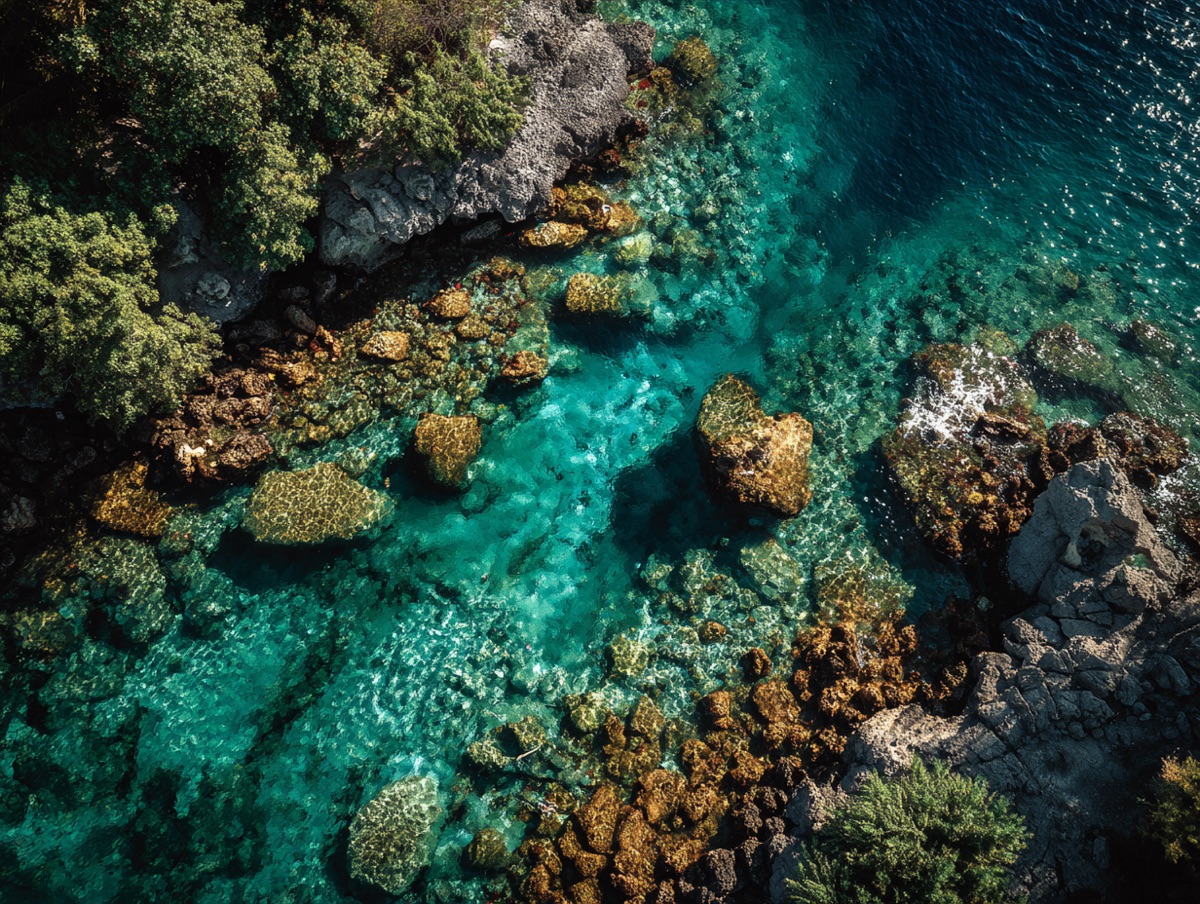
# Coral reef
---
Teeming with life beneath turquoise waters — the image fills the cell's media zone.
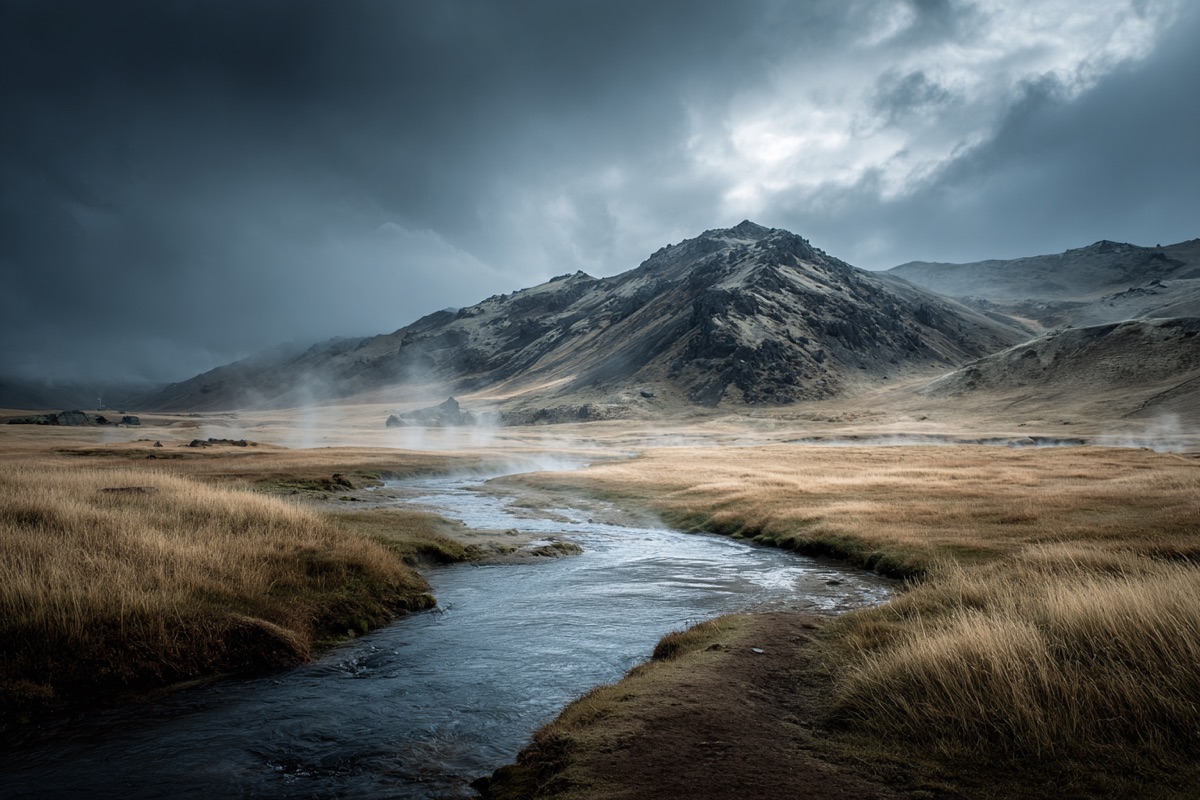
# Hot springs
---
Steam rising from the Icelandic highlands.
{% /bento %}<section data-rune="bento" data-rune-fields="{"gap":"1rem","columns":"6","row-height":"","content-height":"","media-ratio":"","collapse":""}">
<div data-name="grid">
<div data-field="cell" data-rune="bento-cell" data-rune-fields="{"size":"full","cols":"6","rows":"1","content-height":"","media-ratio":""}" data-media-position="start">
<div data-section="media" data-name="media">
<img src="https://assets.refrakt.md/figure-coral-reef.jpg" alt="A coral reef teeming with life">
</div>
<h3 id="coral-reef" data-name="title">Coral reef</h3>
<div data-name="body">
<p>Teeming with life beneath turquoise waters — the image fills the cell's media zone.</p>
</div>
</div>
<div data-field="cell" data-rune="bento-cell" data-rune-fields="{"size":"full","cols":"6","rows":"1","content-height":"","media-ratio":""}" data-media-position="start">
<div data-section="media" data-name="media">
<img src="https://assets.refrakt.md/figure-hot-springs.jpg" alt="Volcanic hot springs">
</div>
<h3 id="hot-springs" data-name="title">Hot springs</h3>
<div data-name="body">
<p>Steam rising from the Icelandic highlands.</p>
</div>
</div>
</div>
</section>
Coral reef
Teeming with life beneath turquoise waters — the image fills the cell's media zone.

Hot springs
Steam rising from the Icelandic highlands.
<section class="rf-bento" data-columns="6" data-gap="1rem" data-row-height="" data-content-height="" data-media-ratio="" data-collapse="" data-elevation="flush" data-rune="bento" data-density="full" style="--bento-columns: 6; --bento-gap: 1rem">
  <div data-name="grid" class="rf-bento__grid">
    <div data-field="cell" class="rf-bento-cell" data-media-position="start" data-size="full" data-cols="6" data-rows="1" data-content-height="" data-media-ratio="" data-rune="bento-cell" data-density="compact" style="--cell-cols: 6; --cell-rows: 1">
      <div data-section="media" data-name="media" class="rf-bento-cell__media" data-guest-fit="clip">
        <img src="https://assets.refrakt.md/figure-coral-reef.jpg" alt="A coral reef teeming with life" />
      </div>
      <div data-name="content" class="rf-bento-cell__content">
        <h3 id="coral-reef" data-name="title" class="rf-bento-cell__title" data-section="title">Coral reef</h3>
        <div data-name="body" class="rf-bento-cell__body" data-section="body">
          <p>Teeming with life beneath turquoise waters — the image fills the cell's media zone.</p>
        </div>
      </div>
    </div>
    <div data-field="cell" class="rf-bento-cell" data-media-position="start" data-size="full" data-cols="6" data-rows="1" data-content-height="" data-media-ratio="" data-rune="bento-cell" data-density="compact" style="--cell-cols: 6; --cell-rows: 1">
      <div data-section="media" data-name="media" class="rf-bento-cell__media" data-guest-fit="clip">
        <img src="https://assets.refrakt.md/figure-hot-springs.jpg" alt="Volcanic hot springs" />
      </div>
      <div data-name="content" class="rf-bento-cell__content">
        <h3 id="hot-springs" data-name="title" class="rf-bento-cell__title" data-section="title">Hot springs</h3>
        <div data-name="body" class="rf-bento-cell__body" data-section="body">
          <p>Steam rising from the Icelandic highlands.</p>
        </div>
      </div>
    </div>
  </div>
</section>
The first zone is media, the last (when there are three) is the footer:
{% bento-cell %}
## Title
 <!-- media -->
---
Body copy. <!-- body -->
---
Footer note. <!-- footer -->
{% /bento-cell %}
media-position controls where the media sits relative to the body (top | bottom | start | end), with a size-derived default — large/full cells place media beside the body, smaller cells stack it on top. Set it on the bento to default every cell at once (heading-sugar grids included); a cell's own media-position still wins.
Frame & elevation
A bento cell exposes the same two surfaces as card (surface model): elevation floats the cell box (box-shadow), and frame chrome decorates the cell's media zone (aspect, crop anchor, silhouette shadow, oversize). frame-aspect and frame-anchor feed bento's existing media knobs (--bento-media-aspect / --bento-media-anchor) rather than a parallel mechanism.
Because heading-sugar cells have no per-cell attribute surface, grid-level frame (preset + facets) and elevation on the bento cascade to every cell as a default — mirroring media-position; a cell's own value still wins. The grid never takes this chrome itself (the cells are the visual cards) — so {% bento elevation="raised" %} lifts each cell, not the grid box.
{% bento columns=6 elevation="raised" frame-aspect="16/9" frame-anchor="center" %}
# Coral reef

---
Teeming with life beneath turquoise waters.
# Hot springs

---
Steam rising from the Icelandic highlands.
{% /bento %}<section data-rune="bento" data-rune-fields="{"gap":"1rem","columns":"6","row-height":"","content-height":"","media-ratio":"","collapse":""}">
<div data-name="grid">
<div data-field="cell" data-rune="bento-cell" data-rune-fields="{"size":"full","cols":"6","rows":"1","content-height":"","media-ratio":""}" data-media-position="start" elevation="raised">
<div data-section="media" data-name="media">
<img src="https://assets.refrakt.md/figure-coral-reef.jpg" alt="A coral reef">
</div>
<h3 id="coral-reef" data-name="title">Coral reef</h3>
<div data-name="body">
<p>Teeming with life beneath turquoise waters.</p>
</div>
</div>
<div data-field="cell" data-rune="bento-cell" data-rune-fields="{"size":"full","cols":"6","rows":"1","content-height":"","media-ratio":""}" data-media-position="start" elevation="raised">
<div data-section="media" data-name="media">
<img src="https://assets.refrakt.md/figure-hot-springs.jpg" alt="Volcanic hot springs">
</div>
<h3 id="hot-springs" data-name="title">Hot springs</h3>
<div data-name="body">
<p>Steam rising from the Icelandic highlands.</p>
</div>
</div>
</div>
</section>Coral reef
Teeming with life beneath turquoise waters.
Hot springs
Steam rising from the Icelandic highlands.
<section class="rf-bento" data-columns="6" data-gap="1rem" data-row-height="" data-content-height="" data-media-ratio="" data-collapse="" data-elevation="flush" data-rune="bento" data-density="full" style="--bento-columns: 6; --bento-gap: 1rem">
  <div data-name="grid" class="rf-bento__grid">
    <div data-field="cell" class="rf-bento-cell" data-media-position="start" data-size="full" data-cols="6" data-rows="1" data-content-height="" data-media-ratio="" data-elevation="raised" data-rune="bento-cell" data-density="compact" style="--cell-cols: 6; --cell-rows: 1">
      <div data-section="media" data-name="media" class="rf-bento-cell__media" data-guest-fit="clip">
        <img src="https://assets.refrakt.md/figure-coral-reef.jpg" alt="A coral reef" />
      </div>
      <div data-name="content" class="rf-bento-cell__content">
        <h3 id="coral-reef" data-name="title" class="rf-bento-cell__title" data-section="title">Coral reef</h3>
        <div data-name="body" class="rf-bento-cell__body" data-section="body">
          <p>Teeming with life beneath turquoise waters.</p>
        </div>
      </div>
    </div>
    <div data-field="cell" class="rf-bento-cell" data-media-position="start" data-size="full" data-cols="6" data-rows="1" data-content-height="" data-media-ratio="" data-elevation="raised" data-rune="bento-cell" data-density="compact" style="--cell-cols: 6; --cell-rows: 1">
      <div data-section="media" data-name="media" class="rf-bento-cell__media" data-guest-fit="clip">
        <img src="https://assets.refrakt.md/figure-hot-springs.jpg" alt="Volcanic hot springs" />
      </div>
      <div data-name="content" class="rf-bento-cell__content">
        <h3 id="hot-springs" data-name="title" class="rf-bento-cell__title" data-section="title">Hot springs</h3>
        <div data-name="body" class="rf-bento-cell__body" data-section="body">
          <p>Steam rising from the Icelandic highlands.</p>
        </div>
      </div>
    </div>
  </div>
</section>
Aligning cells
Two optional knobs keep a grid visually tidy. They act on perpendicular axes — a cell is either a column cell (media stacked top/bottom) or a beside cell (media start/end), so the two never overlap — and each can be set as a grid-wide default or overridden per cell. The grid default is the only lever heading-sugar grids have, since their cells are generated.
content-height(sm·md·lg·xl) pins the text area of column cells to a fixed height, so titles and body copy line up across the row no matter how much each cell says. The media zone absorbs whatever height is left in the track.media-ratio(1/3·2/5·1/2·3/5·2/3) sets how much of a beside cell's width the media takes; the content gets the rest.
{% bento columns=4 levels="2" row-height="lg" content-height="md" media-position="bottom" collapse="sm" %}
### Coral reef

---
Teeming with life beneath turquoise waters.
### Hot springs

---
Steam rising from the Icelandic highlands, where geothermal vents warm the rivers and pools all year round.
{% /bento %}<section data-rune="bento" data-rune-fields="{"gap":"1rem","columns":"4","row-height":"lg","content-height":"md","media-ratio":"","collapse":"sm"}">
<div data-name="grid">
<div data-field="cell" data-rune="bento-cell" data-rune-fields="{"size":"","cols":"2","rows":"1","content-height":"","media-ratio":""}" data-media-position="bottom">
<div data-section="media" data-name="media">
<img src="https://assets.refrakt.md/figure-coral-reef.jpg" alt="A coral reef teeming with life">
</div>
<h3 id="coral-reef" data-name="title">Coral reef</h3>
<div data-name="body">
<p>Teeming with life beneath turquoise waters.</p>
</div>
</div>
<div data-field="cell" data-rune="bento-cell" data-rune-fields="{"size":"","cols":"2","rows":"1","content-height":"","media-ratio":""}" data-media-position="bottom">
<div data-section="media" data-name="media">
<img src="https://assets.refrakt.md/figure-hot-springs.jpg" alt="Volcanic hot springs">
</div>
<h3 id="hot-springs" data-name="title">Hot springs</h3>
<div data-name="body">
<p>Steam rising from the Icelandic highlands, where geothermal vents warm the rivers and pools all year round.</p>
</div>
</div>
</div>
</section>Coral reef
Teeming with life beneath turquoise waters.
Hot springs
Steam rising from the Icelandic highlands, where geothermal vents warm the rivers and pools all year round.
<section class="rf-bento" data-columns="4" data-gap="1rem" data-row-height="lg" data-content-height="md" data-media-ratio="" data-collapse="sm" data-elevation="flush" data-rune="bento" data-density="full" style="--bento-columns: 4; --bento-gap: 1rem">
  <div data-name="grid" class="rf-bento__grid">
    <div data-field="cell" class="rf-bento-cell" data-media-position="bottom" data-size="" data-cols="2" data-rows="1" data-content-height="" data-media-ratio="" data-rune="bento-cell" data-density="compact" style="--cell-cols: 2; --cell-rows: 1">
      <div data-section="media" data-name="media" class="rf-bento-cell__media" data-guest-fit="clip">
        <img src="https://assets.refrakt.md/figure-coral-reef.jpg" alt="A coral reef teeming with life" />
      </div>
      <div data-name="content" class="rf-bento-cell__content">
        <h3 id="coral-reef" data-name="title" class="rf-bento-cell__title" data-section="title">Coral reef</h3>
        <div data-name="body" class="rf-bento-cell__body" data-section="body">
          <p>Teeming with life beneath turquoise waters.</p>
        </div>
      </div>
    </div>
    <div data-field="cell" class="rf-bento-cell" data-media-position="bottom" data-size="" data-cols="2" data-rows="1" data-content-height="" data-media-ratio="" data-rune="bento-cell" data-density="compact" style="--cell-cols: 2; --cell-rows: 1">
      <div data-section="media" data-name="media" class="rf-bento-cell__media" data-guest-fit="clip">
        <img src="https://assets.refrakt.md/figure-hot-springs.jpg" alt="Volcanic hot springs" />
      </div>
      <div data-name="content" class="rf-bento-cell__content">
        <h3 id="hot-springs" data-name="title" class="rf-bento-cell__title" data-section="title">Hot springs</h3>
        <div data-name="body" class="rf-bento-cell__body" data-section="body">
          <p>Steam rising from the Icelandic highlands, where geothermal vents warm the rivers and pools all year round.</p>
        </div>
      </div>
    </div>
  </div>
</section>
Both cells pin their text to the same height, so the captions align even though one is longer. For a beside cell, reach for media-ratio instead:
{% bento-cell size="large" media-ratio="1/3" %}
## Spotlight

---
The image takes a third of the width; the copy fills the rest.
{% /bento-cell %}
Set either on the bento to establish a grid-wide default, then override it on an individual {% bento-cell %}. Both revert to natural height / the default split on the mobile stack.
Explicit cells
For full per-tile control (the dashboard case), author {% bento-cell %} tags directly. When a bento contains explicit cells, heading sugar is short-circuited — the cells are used as-is. Each cell accepts precise cols / rows spans, a size preset, media-position, and an href that turns the whole tile into a link.
{% bento columns=6 %}
{% bento-cell cols=4 rows=2 href="/runes/rune-catalog" %}
## Overview

The hero tile spans four columns and two rows, and the whole cell links out.
{% /bento-cell %}

{% bento-cell cols=2 media-position="end" %}
## Sidebar

A two-column companion tile.
{% /bento-cell %}
{% /bento %}<section data-rune="bento" data-rune-fields="{"gap":"1rem","columns":"6","row-height":"","content-height":"","media-ratio":"","collapse":""}">
<div data-name="grid">
<div data-field="cell" data-rune="bento-cell" data-rune-fields="{"size":"medium","cols":"4","rows":"2","content-height":"","media-ratio":""}" data-media-position="top">
<h3 id="overview" data-name="title">Overview</h3>
<div data-name="body">
<p>The hero tile spans four columns and two rows, and the whole cell links out.</p>
</div>
<a data-name="link" href="/runes/rune-catalog" aria-hidden="true" tabindex="-1"></a>
</div>
<div data-field="cell" data-rune="bento-cell" data-rune-fields="{"size":"medium","cols":"2","rows":"1","content-height":"","media-ratio":""}" data-media-position="end">
<h3 id="sidebar" data-name="title">Sidebar</h3>
<div data-name="body">
<p>A two-column companion tile.</p>
</div>
</div>
</div>
</section>Overview
The hero tile spans four columns and two rows, and the whole cell links out.
Sidebar
A two-column companion tile.
<section class="rf-bento" data-columns="6" data-gap="1rem" data-row-height="" data-content-height="" data-media-ratio="" data-collapse="" data-elevation="flush" data-rune="bento" data-density="full" style="--bento-columns: 6; --bento-gap: 1rem">
  <div data-name="grid" class="rf-bento__grid">
    <div data-field="cell" class="rf-bento-cell" data-media-position="top" data-size="medium" data-cols="4" data-rows="2" data-content-height="" data-media-ratio="" data-rune="bento-cell" data-density="compact" style="--cell-cols: 4; --cell-rows: 2">
      <div data-name="content" class="rf-bento-cell__content">
        <h3 id="overview" data-name="title" class="rf-bento-cell__title" data-section="title">Overview</h3>
        <div data-name="body" class="rf-bento-cell__body" data-section="body">
          <p>The hero tile spans four columns and two rows, and the whole cell links out.</p>
        </div>
      </div>
      <a data-name="link" href="/runes/rune-catalog" aria-hidden="true" tabindex="-1" class="rf-bento-cell__link"></a>
    </div>
    <div data-field="cell" class="rf-bento-cell" data-media-position="end" data-size="medium" data-cols="2" data-rows="1" data-content-height="" data-media-ratio="" data-rune="bento-cell" data-density="compact" style="--cell-cols: 2; --cell-rows: 1">
      <div data-name="content" class="rf-bento-cell__content">
        <h3 id="sidebar" data-name="title" class="rf-bento-cell__title" data-section="title">Sidebar</h3>
        <div data-name="body" class="rf-bento-cell__body" data-section="body">
          <p>A two-column companion tile.</p>
        </div>
      </div>
    </div>
  </div>
</section>
Mixing headings and explicit cells in one grid is not a supported pattern — if any explicit cell is present, loose headings are ignored.
Responsive collapse
Collapse is binary. Above the chosen breakpoint, the grid renders exactly as authored — your columns and per-cell cols/rows are honored without reflow. Below it, the grid drops to a single stacked column with auto row tracks (cells size to their content; nothing clips). The span auto-cap still applies, so a cell wider than columns is bounded to the grid even before collapse.
{% bento collapse="md" %}
| Value | Collapses to one column at |
|---|---|
sm (default) | 640px container width |
md | 768px container width |
lg | 1024px container width |
never | never collapses |
Choose collapse to match the narrowest width your authored grid can comfortably hold. A 6-column grid with wide cells probably wants md or lg; a small grid of small cells can stay at sm. There is no intermediate column reduction by default — if the grid genuinely needs to fit a range of container widths, pick columns for the lowest acceptable width and let the wider container render the cells with extra breathing room.
Attributes
bento
| Attribute | Type | Required | Description |
|---|---|---|---|
gap | string | — | Space between grid cells (CSS length value) |
columns | number | — | Number of columns in the bento grid (default 6) |
levels | string | — | Heading-sugar footprint ladder, indexed by absolute heading level (rung 0 = h1, rung 1 = h2, …): comma-separated rungs, each a column count "W" (× 1 row) or a footprint "WxH" (e.g. "6,5,4,3,2,1" or "4x2,3x1,2x1"). Depths beyond the last rung clamp to it. Omit for tiered sizing. Ignored for explicit-cell grids. |
row-height | "sm" | "md" | "lg" | "xl" | — | Uniform grid row track height: sm, md (default), lg, or xl |
content-height | "sm" | "md" | "lg" | "xl" | — | Grid default: pin each column cell's text area to a fixed height (sm/md/lg/xl) so cells align vertically; per-cell overridable; reverts to natural height on mobile |
media-ratio | "1/3" | "2/5" | "1/2" | "3/5" | "2/3" | — | Grid default for beside (start/end) cells: the media zone's share of the cell width; per-cell overridable |
media-position | "top" | "bottom" | "start" | "end" | "cover" | — | Grid default media placement for every cell (overrides the per-cell size-derived default); a cell's own media-position still wins |
collapse | "sm" | "md" | "lg" | "never" | — | Binary collapse breakpoint: above it the grid renders as authored, below it cells stack into a single column with auto row tracks. Default sm (640px). `never` to disable. |
Universal attributes
bg
The background layer (SPEC-088): image, video, gradient, flat overlay wash and legibility scrim, in a single injected layer behind the rune's content.
| Attribute | Type | Required | Description |
|---|---|---|---|
bg | string | — | Background preset applied to this block |
bg-from | string | — | Gradient start colour — a semantic token name (→ var(--rf-color-*)) |
bg-gradient | "to-t" | "to-b" | "to-l" | "to-r" | "to-tr" | "to-br" | "to-bl" | "to-tl" | — | Gradient direction (bounded named set) |
bg-gradient-type | "linear" | "radial" | "conic" | — | Gradient type |
bg-to | string | — | Gradient end colour — a semantic token name |
bg-via | string | — | Optional middle gradient stop — a semantic token name |
scrim | "top" | "bottom" | "left" | "right" | "none" | — | Scrim direction (heaviest edge); presence turns the scrim on, "none" opts out of the default cover scrim |
scrim-blur | "none" | "sm" | "md" | "lg" | — | Frost scrim blur amount |
scrim-strength | "sm" | "md" | "lg" | — | Gradient scrim strength |
scrim-tone | "dark" | "light" | — | Whether the scrim darkens (for light text) or lightens (for dark text) |
scrim-type | "gradient" | "frost" | — | Scrim treatment: gradient (default) or frost (backdrop blur) |
elevation
The chrome/depth ladder (SPEC-107). The skin maps each rung to a chrome bundle by attribute, so there is no BEM class.
| Attribute | Type | Required | Description |
|---|---|---|---|
elevation | "sunken" | "flush" | "flat" | "raised" | "floating" | "overlay" | "none" | "sm" | "md" | "lg" | — | Surface depth on the SPEC-107 ladder (sunken→overlay); none/sm/md/lg are deprecated aliases |
inset
Internal padding override.
| Attribute | Type | Required | Description |
|---|---|---|---|
inset | "flush" | "tight" | "default" | "loose" | "breathe" | — | Inner padding of this block |
motion
Scroll-reveal entrance (SPEC-105). The author declares the character, the theme owns the choreography, a behaviour owns the timing.
| Attribute | Type | Required | Description |
|---|---|---|---|
reveal | "none" | "fade" | "slide" | "scale" | "blur" | — | Scroll-reveal entrance character (none|fade|slide|scale|blur); the theme owns the choreography |
stagger | boolean | — | Cascade this block's items in as it reveals (no-op on single-child runes) |
spacing
Block-level rhythm override.
| Attribute | Type | Required | Description |
|---|---|---|---|
spacing | "flush" | "tight" | "default" | "loose" | "breathe" | — | Vertical spacing above and below this block |
substrate
Generated pattern fills (SPEC-087). Markers only — the engine sets the attributes and cell/opacity custom properties, CSS draws the pattern.
| Attribute | Type | Required | Description |
|---|---|---|---|
substrate | "dots" | "grid" | "lines" | "cross" | "checker" | "none" | — | Generated surface pattern |
substrate-fill | "inherit" | "inset" | — | Surface fill the pattern sits on (full colour stays with tint) |
substrate-opacity | "sm" | "md" | "lg" | — | Pattern ink strength |
substrate-size | "sm" | "md" | "lg" | — | Pattern cell size |
substrate-target | "self" | "media" | — | Which surface the pattern fills (overrides the rune/theme default) |
tint
Per-rune colour override (SPEC-053): a named tint from the theme registry, with inline per-token overrides layered on top.
| Attribute | Type | Required | Description |
|---|---|---|---|
tint | string | — | Color tint preset applied to this block |
tint-mode | "auto" | "dark" | "light" | — | Whether the tint adapts to auto, dark, or light mode |
width
The track a block rune occupies.
| Attribute | Type | Required | Description |
|---|---|---|---|
width | "compact" | "narrow" | "content" | "wide" | "full" | — | Maximum width constraint for this block |
| Not available | Why |
|---|---|
| dropcap, reading | this rune declares no prose body |
| frame | this rune declares neither a `frameTarget` nor a media section |
| prominence | this rune has no page-section header |
bento-cell
| Attribute | Type | Required | Description |
|---|---|---|---|
size | string | — | |
cols | number | — | |
rows | number | — | |
media-position | "top" | "bottom" | "start" | "end" | "cover" | — | |
content-height | "sm" | "md" | "lg" | "xl" | — | Override the grid content-height for this cell (column cells): pin its text area to sm/md/lg/xl |
media-ratio | "1/3" | "2/5" | "1/2" | "3/5" | "2/3" | — | Override the grid media-ratio for this cell (beside cells): the media zone's share of the cell width |
href | string | — |
Universal attributes
bg
The background layer (SPEC-088): image, video, gradient, flat overlay wash and legibility scrim, in a single injected layer behind the rune's content.
| Attribute | Type | Required | Description |
|---|---|---|---|
bg | string | — | Background preset applied to this block |
bg-from | string | — | Gradient start colour — a semantic token name (→ var(--rf-color-*)) |
bg-gradient | "to-t" | "to-b" | "to-l" | "to-r" | "to-tr" | "to-br" | "to-bl" | "to-tl" | — | Gradient direction (bounded named set) |
bg-gradient-type | "linear" | "radial" | "conic" | — | Gradient type |
bg-to | string | — | Gradient end colour — a semantic token name |
bg-via | string | — | Optional middle gradient stop — a semantic token name |
scrim | "top" | "bottom" | "left" | "right" | "none" | — | Scrim direction (heaviest edge); presence turns the scrim on, "none" opts out of the default cover scrim |
scrim-blur | "none" | "sm" | "md" | "lg" | — | Frost scrim blur amount |
scrim-strength | "sm" | "md" | "lg" | — | Gradient scrim strength |
scrim-tone | "dark" | "light" | — | Whether the scrim darkens (for light text) or lightens (for dark text) |
scrim-type | "gradient" | "frost" | — | Scrim treatment: gradient (default) or frost (backdrop blur) |
dropcap
Per-instance drop-cap opt-in (SPEC-108).
| Attribute | Type | Required | Description |
|---|---|---|---|
dropcap | boolean | — | Style the opening letter of a prose body as a drop cap (SPEC-108). Honoured only when the body reads as prose; ignored otherwise. |
elevation
The chrome/depth ladder (SPEC-107). The skin maps each rung to a chrome bundle by attribute, so there is no BEM class.
| Attribute | Type | Required | Description |
|---|---|---|---|
elevation | "sunken" | "flush" | "flat" | "raised" | "floating" | "overlay" | "none" | "sm" | "md" | "lg" | — | Surface depth on the SPEC-107 ladder (sunken→overlay); none/sm/md/lg are deprecated aliases |
frame
Surface chrome (SPEC-086): a named preset from the theme registry with inline `frame-*` overrides layered on top.
| Attribute | Type | Required | Description |
|---|---|---|---|
frame | string | — | Named frame preset presenting this block's media surface |
frame-anchor | string | — | Crop focal point when the guest is cut (object-position) |
frame-aspect | string | — | Aspect ratio of the framed media, e.g. "16/9" |
frame-displace | "top" | "bottom" | "end" | "bottom-end" | "top-end" | — | Edge/corner the framed guest moves toward |
frame-displace-mode | "peek" | "bleed" | — | How displacement renders: `peek` (default) translates the guest visually inside its frame target; `bleed` uses negative margin on the media zone so following layout pulls up — extends past a section like a hero without leaving a gap above |
frame-offset | "none" | "sm" | "md" | "lg" | "xl" | "2xl" | "3xl" | "4xl" | — | Displacement distance (non-linear named scale: sm…xl ride the block-spacing tokens, 2xl/3xl/4xl step up to section-spacing for bleed-mode displacements that clear a section edge) |
frame-overflow | "clip" | "bleed" | — | How the frame handles a guest whose content is wider than it: `clip` (default) keeps it inside the rounded frame; `bleed` runs an overflowing guest out to the layout edge on a narrow viewport so it reads as cropped by the screen (a bleed host only — hero/feature) |
frame-oversize | string | — | How far the guest exceeds its slot (scale factor) |
frame-place | string | — | Guest-box alignment in the slot (e.g. "left top") |
frame-shadow | "none" | "sm" | "md" | "lg" | — | Silhouette drop-shadow strength for the framed media |
inset
Internal padding override.
| Attribute | Type | Required | Description |
|---|---|---|---|
inset | "flush" | "tight" | "default" | "loose" | "breathe" | — | Inner padding of this block |
motion
Scroll-reveal entrance (SPEC-105). The author declares the character, the theme owns the choreography, a behaviour owns the timing.
| Attribute | Type | Required | Description |
|---|---|---|---|
reveal | "none" | "fade" | "slide" | "scale" | "blur" | — | Scroll-reveal entrance character (none|fade|slide|scale|blur); the theme owns the choreography |
stagger | boolean | — | Cascade this block's items in as it reveals (no-op on single-child runes) |
prominence
Header emphasis (SPEC-107). Scales a rune's page-section header; the skin maps it to a type register by attribute, so there is no BEM class.
| Attribute | Type | Required | Description |
|---|---|---|---|
prominence | "quiet" | "normal" | "prominent" | "display" | — | Section-header emphasis (only on page-section-header family runes) |
reading
Editorial register for body text (SPEC-108). The author picks the register; the theme owns the magnitude.
| Attribute | Type | Required | Description |
|---|---|---|---|
reading | "fine" | "ui" | "prose" | — | Reading register for this block’s body (SPEC-108): fine | ui | prose. The theme owns the editorial treatment. |
spacing
Block-level rhythm override.
| Attribute | Type | Required | Description |
|---|---|---|---|
spacing | "flush" | "tight" | "default" | "loose" | "breathe" | — | Vertical spacing above and below this block |
substrate
Generated pattern fills (SPEC-087). Markers only — the engine sets the attributes and cell/opacity custom properties, CSS draws the pattern.
| Attribute | Type | Required | Description |
|---|---|---|---|
substrate | "dots" | "grid" | "lines" | "cross" | "checker" | "none" | — | Generated surface pattern |
substrate-fill | "inherit" | "inset" | — | Surface fill the pattern sits on (full colour stays with tint) |
substrate-opacity | "sm" | "md" | "lg" | — | Pattern ink strength |
substrate-size | "sm" | "md" | "lg" | — | Pattern cell size |
substrate-target | "self" | "media" | — | Which surface the pattern fills (overrides the rune/theme default) |
tint
Per-rune colour override (SPEC-053): a named tint from the theme registry, with inline per-token overrides layered on top.
| Attribute | Type | Required | Description |
|---|---|---|---|
tint | string | — | Color tint preset applied to this block |
tint-mode | "auto" | "dark" | "light" | — | Whether the tint adapts to auto, dark, or light mode |
width
The track a block rune occupies.
| Attribute | Type | Required | Description |
|---|---|---|---|
width | "compact" | "narrow" | "content" | "wide" | "full" | — | Maximum width constraint for this block |
Common attributes
All block runes share these attributes for layout and theming.
| Attribute | Type | Default | Description |
|---|---|---|---|
width | string | content | Page grid width: content, wide, or full |
spacing | string | — | Vertical spacing: flush, tight, default, loose, or breathe |
inset | string | — | Horizontal padding: flush, tight, default, loose, or breathe |
tint | string | — | Named colour tint from theme configuration |
tint-mode | string | auto | Colour scheme override: auto, dark, or light |
bg | string | — | Named background preset from theme configuration |
Cells are tint-deferrable: apply tint / tint-mode to an individual {% bento-cell %} for a multi-coloured grid.