Figure
A captioned container. A figure holds an image most often, but it accepts any block content (a code block, a table, a diagram, another rune) and captions it, with sizing and alignment controls.
What it accepts
Everything in the body is kept, in the order you wrote it:
- Media (an image, a video, or a
placeholder:/icon:image) is the figure's media slot. An image in a paragraph of its own is unwrapped, so it sits directly in the figure. - Anything else (a fenced code block, a table, a list, a nested rune, a paragraph) is emitted as written.
- The caption comes from the
captionattribute or, failing that, the first paragraph that holds no image. It always renders last, below the content.
With caption attribute
Set the caption directly on the rune.
{% figure caption="A coral reef teeming with life beneath turquoise waters" size="large" align="center" %}

{% /figure %}<figure data-rune="figure" data-rune-fields="{"size":"large","align":"center"}" typeof="ImageObject">
<img src="https://assets.refrakt.md/figure-coral-reef.jpg" alt="Coral reef" data-name="image" property="contentUrl">
<figcaption data-name="caption" property="caption">A coral reef teeming with life beneath turquoise waters</figcaption>
</figure>
<figure class="rf-figure rf-figure--large rf-figure--center" typeof="ImageObject" data-size="large" data-align="center" data-elevation="flat" data-rune="figure" data-density="compact">
  <img src="https://assets.refrakt.md/figure-coral-reef.jpg" alt="Coral reef" data-name="image" property="contentUrl" class="rf-figure__image" />
  <figcaption data-name="caption" property="caption" class="rf-figure__caption" data-section="description">A coral reef teeming with life beneath turquoise waters</figcaption>
</figure>
With paragraph caption
If no caption attribute is provided, the first paragraph inside the rune is used as the caption.
{% figure size="medium" %}
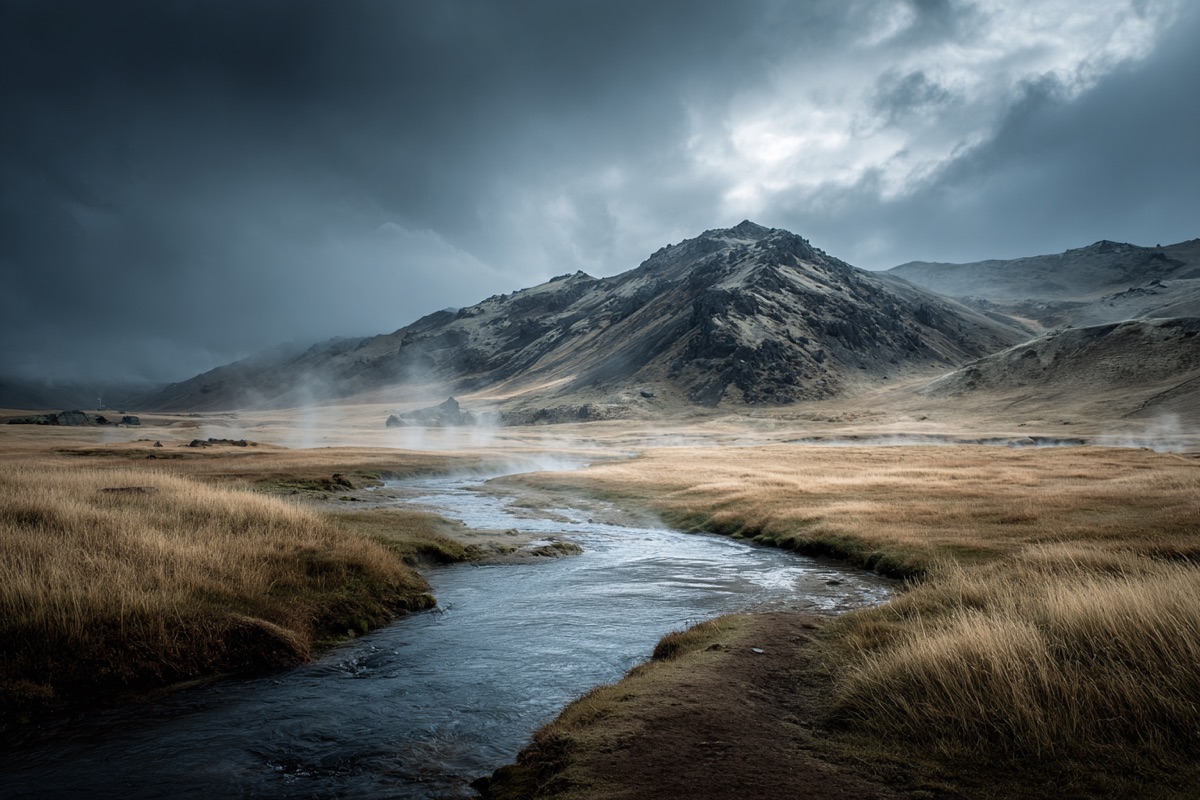
Steam rising from volcanic hot springs in the Icelandic highlands.
{% /figure %}<figure data-rune="figure" data-rune-fields="{"size":"medium"}" typeof="ImageObject">
<img src="https://assets.refrakt.md/figure-hot-springs.jpg" alt="Hot springs" data-name="image" property="contentUrl">
<figcaption data-name="caption" property="caption">
<p>Steam rising from volcanic hot springs in the Icelandic highlands.</p>
</figcaption>
</figure>
Steam rising from volcanic hot springs in the Icelandic highlands.
<figure class="rf-figure rf-figure--medium rf-figure--center" typeof="ImageObject" data-size="medium" data-align="center" data-elevation="flat" data-rune="figure" data-density="compact">
  <img src="https://assets.refrakt.md/figure-hot-springs.jpg" alt="Hot springs" data-name="image" property="contentUrl" class="rf-figure__image" />
  <figcaption data-name="caption" property="caption" class="rf-figure__caption" data-section="description">
    <p>Steam rising from volcanic hot springs in the Icelandic highlands.</p>
  </figcaption>
</figure>
Captioning code, tables and diagrams
A figure captions whatever it holds. Use it to caption a code block, a snippet, a table, or a diagram.
{% figure caption="The request handler and its retry policy" %}
```ts
export async function handler(req: Request) {
	return fetch(req, { retry: 3 });
}
```

| Option  | Default |
|---------|---------|
| `retry` | `3`     |
{% /figure %}<figure data-rune="figure" data-rune-fields="{"body":"mixed"}">
<div class="rf-codeblock">
<pre data-language="ts">
<code data-language="ts">export async function handler(req: Request) {
return fetch(req, { retry: 3 });
}
</code>
</pre>
</div>
<div class="rf-table-wrapper">
<table>
<thead>
<tr>
<th>Option</th>
<th>Default</th>
</tr>
</thead>
<tbody>
<tr>
<td>
<code>retry</code>
</td>
<td>
<code>3</code>
</td>
</tr>
</tbody>
</table>
</div>
<figcaption data-name="caption">The request handler and its retry policy</figcaption>
</figure>export async function handler(req: Request) {
return fetch(req, { retry: 3 });
}
| Option | Default |
|---|---|
retry | 3 |
<figure class="rf-figure rf-figure--default rf-figure--center" data-size="default" data-align="center" data-elevation="flat" data-rune="figure" data-density="compact">
  <div class="rf-codeblock">
    <pre data-language="ts"><code data-language="ts">export async function handler(req: Request) {
	return fetch(req, { retry: 3 });
}
</code></pre>
  </div>
  <div class="rf-table-wrapper">
    <table>
      <thead>
        <tr>
          <th>Option</th>
          <th>Default</th>
        </tr>
      </thead>
      <tbody>
        <tr>
          <td>
            <code>retry</code>
          </td>
          <td>
            <code>3</code>
          </td>
        </tr>
      </tbody>
    </table>
  </div>
  <figcaption data-name="caption" class="rf-figure__caption" data-section="description">The request handler and its retry policy</figcaption>
</figure>
Codegroup is the other way to label code: it puts a title bar above the block, where figure puts a caption below it. Use codegroup when the label is a filename and figure when it describes what the reader is looking at.
Structured data
A figure whose body is only media publishes an ImageObject, with the image as contentUrl and the caption as caption. Once it holds anything else, it publishes no schema.org type at all: its caption then describes more than the image, so calling the figure an ImageObject would be a false claim. refrakt inspect figure shows the row, and the selection rule as by field body.
Elevation & frame
A figure is a frame around its image, so it sets frameTarget: "self" (surface model): frame chrome lands on the figure itself. elevation floats the figure as a box (box-shadow); frame-shadow is the image's silhouette drop-shadow; frame-aspect crops it to a ratio.
{% figure elevation="floating" frame-aspect="4/3" caption="Framed at 4/3 with a lifted figure" %}

{% /figure %}<figure data-rune="figure" typeof="ImageObject" elevation="floating">
<img src="https://assets.refrakt.md/figure-coral-reef.jpg" alt="Coral reef" data-name="image" property="contentUrl">
<figcaption data-name="caption" property="caption">Framed at 4/3 with a lifted figure</figcaption>
<meta data-field="frame-aspect" content="4/3">
</figure><figure class="rf-figure rf-figure--default rf-figure--center" typeof="ImageObject" data-size="default" data-align="center" data-elevation="floating" data-rune="figure" data-density="compact" style="--frame-aspect: 4/3">
<img src="https://assets.refrakt.md/figure-coral-reef.jpg" alt="Coral reef" data-name="image" property="contentUrl" class="rf-figure__image" />
<figcaption data-name="caption" property="caption" class="rf-figure__caption" data-section="description">Framed at 4/3 with a lifted figure</figcaption>
</figure>Attributes
| Attribute | Type | Required | Description |
|---|---|---|---|
size | "small" | "medium" | "large" | "full" | — | Display width of the figure |
align | "left" | "center" | "right" | — | Horizontal alignment of the figure |
caption | string | — | Caption text displayed below the figure |
Universal attributes
bg
The background layer (SPEC-088): image, video, gradient, flat overlay wash and legibility scrim, in a single injected layer behind the rune's content.
| Attribute | Type | Required | Description |
|---|---|---|---|
bg | string | — | Background preset applied to this block |
bg-from | string | — | Gradient start colour — a semantic token name (→ var(--rf-color-*)) |
bg-gradient | "to-t" | "to-b" | "to-l" | "to-r" | "to-tr" | "to-br" | "to-bl" | "to-tl" | — | Gradient direction (bounded named set) |
bg-gradient-type | "linear" | "radial" | "conic" | — | Gradient type |
bg-to | string | — | Gradient end colour — a semantic token name |
bg-via | string | — | Optional middle gradient stop — a semantic token name |
scrim | "top" | "bottom" | "left" | "right" | "none" | — | Scrim direction (heaviest edge); presence turns the scrim on, "none" opts out of the default cover scrim |
scrim-blur | "none" | "sm" | "md" | "lg" | — | Frost scrim blur amount |
scrim-strength | "sm" | "md" | "lg" | — | Gradient scrim strength |
scrim-tone | "dark" | "light" | — | Whether the scrim darkens (for light text) or lightens (for dark text) |
scrim-type | "gradient" | "frost" | — | Scrim treatment: gradient (default) or frost (backdrop blur) |
elevation
The chrome/depth ladder (SPEC-107). The skin maps each rung to a chrome bundle by attribute, so there is no BEM class.
| Attribute | Type | Required | Description |
|---|---|---|---|
elevation | "sunken" | "flush" | "flat" | "raised" | "floating" | "overlay" | "none" | "sm" | "md" | "lg" | — | Surface depth on the SPEC-107 ladder (sunken→overlay); none/sm/md/lg are deprecated aliases |
frame
Surface chrome (SPEC-086): a named preset from the theme registry with inline `frame-*` overrides layered on top.
| Attribute | Type | Required | Description |
|---|---|---|---|
frame | string | — | Named frame preset presenting this block's media surface |
frame-anchor | string | — | Crop focal point when the guest is cut (object-position) |
frame-aspect | string | — | Aspect ratio of the framed media, e.g. "16/9" |
frame-displace | "top" | "bottom" | "end" | "bottom-end" | "top-end" | "both" | — | Edge/corner the framed guest moves toward |
frame-displace-mode | "peek" | "bleed" | — | How displacement renders: `peek` (default) translates the guest visually inside its frame target; `bleed` uses negative margin on the media zone so following layout pulls up — extends past a section like a hero without leaving a gap above |
frame-offset | "none" | "sm" | "md" | "lg" | "xl" | "2xl" | "3xl" | "4xl" | — | Displacement distance (non-linear named scale: sm…xl ride the block-spacing tokens, 2xl/3xl/4xl step up to section-spacing for bleed-mode displacements that clear a section edge) |
frame-overflow | "clip" | "bleed" | — | How the frame handles a guest whose content is wider than it: `clip` (default) keeps it inside the rounded frame; `bleed` runs an overflowing guest out to the layout edge on a narrow viewport so it reads as cropped by the screen (a bleed host only — hero/feature) |
frame-oversize | string | — | How far the guest exceeds its slot (scale factor) |
frame-place | string | — | Guest-box alignment in the slot (e.g. "left top") |
frame-shadow | "none" | "sm" | "md" | "lg" | — | Silhouette drop-shadow strength for the framed media |
inset
Internal padding override.
| Attribute | Type | Required | Description |
|---|---|---|---|
inset | "flush" | "tight" | "default" | "loose" | "breathe" | — | Inner padding of this block |
motion
Scroll-reveal entrance (SPEC-105). The author declares the character, the theme owns the choreography, a behaviour owns the timing.
| Attribute | Type | Required | Description |
|---|---|---|---|
reveal | "none" | "fade" | "slide" | "scale" | "blur" | — | Scroll-reveal entrance character (none|fade|slide|scale|blur); the theme owns the choreography |
stagger | boolean | — | Cascade this block's items in as it reveals (no-op on single-child runes) |
prominence
Header emphasis (SPEC-107). Scales a rune's page-section header; the skin maps it to a type register by attribute, so there is no BEM class.
| Attribute | Type | Required | Description |
|---|---|---|---|
prominence | "quiet" | "normal" | "prominent" | "display" | — | Section-header emphasis (only on page-section-header family runes) |
spacing
Block-level rhythm override.
| Attribute | Type | Required | Description |
|---|---|---|---|
spacing | "flush" | "tight" | "default" | "loose" | "breathe" | — | Vertical spacing above and below this block |
substrate
Generated pattern fills (SPEC-087). Markers only — the engine sets the attributes and cell/opacity custom properties, CSS draws the pattern.
| Attribute | Type | Required | Description |
|---|---|---|---|
substrate | "dots" | "grid" | "lines" | "cross" | "checker" | "none" | — | Generated surface pattern |
substrate-fill | "inherit" | "inset" | — | Surface fill the pattern sits on (full colour stays with tint) |
substrate-opacity | "sm" | "md" | "lg" | — | Pattern ink strength |
substrate-size | "sm" | "md" | "lg" | — | Pattern cell size |
substrate-target | "self" | "media" | — | Which surface the pattern fills (overrides the rune/theme default) |
tint
Per-rune colour override (SPEC-053): a named tint from the theme registry, with inline per-token overrides layered on top.
| Attribute | Type | Required | Description |
|---|---|---|---|
tint | string | — | Color tint preset applied to this block |
tint-mode | "auto" | "dark" | "light" | — | Whether the tint adapts to auto, dark, or light mode |
width
The track a block rune occupies.
| Attribute | Type | Required | Description |
|---|---|---|---|
width | "compact" | "narrow" | "content" | "wide" | "full" | — | Maximum width constraint for this block |
| Not available | Why |
|---|---|
| dropcap, reading | this rune declares no prose body |